
Project Deliverables Optimization Using Microsoft Excel
Project Background
While working HDR as Transmission and Distribution EIT, a majority of our deliverables were created used Microsoft Excel. This was because we dealt with Overhead and Underground design so it was easiest to use Microsoft Excel and produce professional documents. When I was first on boarded to the team the excel sheets where very simple and required a lot of manual copying and pasting units between different sheet. This allowed for easy mistakes to be made both in formatting as well as units being counted or edited properly because there was potential for edits to be copied into one area not another and not be counted in the BOM. With some in experience in Excel from a class I took in my undergrad I took some time outside of work to renovate the excel sheets to alleviate some of the pains required when finalizing Staking Sheets and the BOM
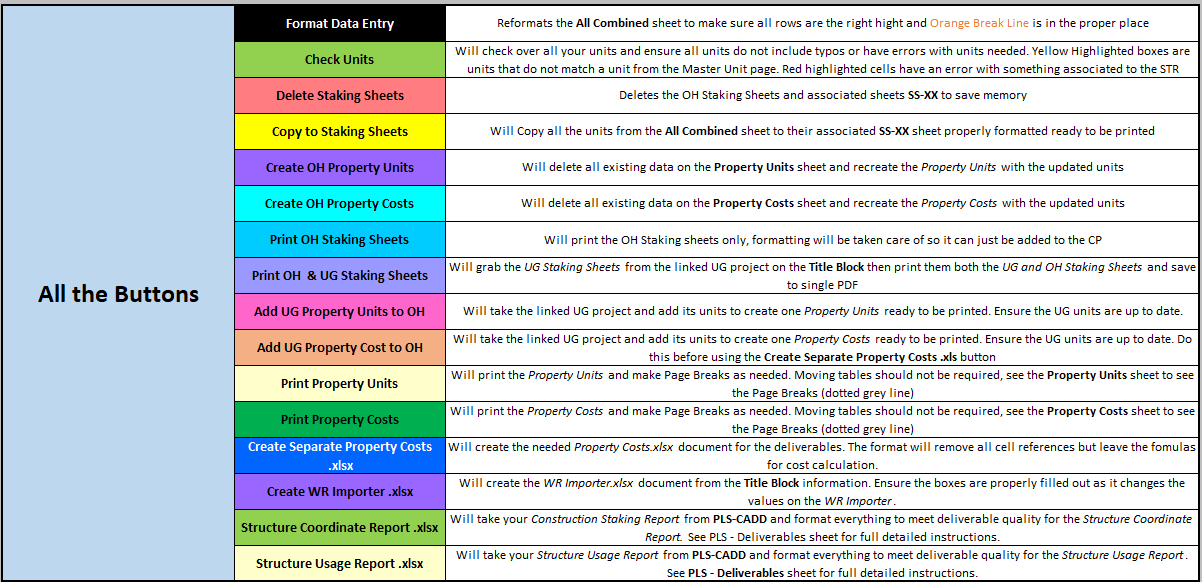
I decided that the best way to fix the issue of having to manually copy and paste units over to individual sheets was to utilize macros and write a script to do it. I would write segment of code in VBA then implement buttons to do the commands. Each command would have its own button to reduce run time and allow for the user to redo particular parts without having sit through the entire script rerunning. For this project to be successful the commands had to be simply and follow the current workflow for how deliverables were made but speeding up the process with automation.
Operations need to be Automated:
Copying units from the All Combined sheet to individual Staking Sheets
Copy the units from the All Combined sheet and create a Property Units page (Bill of Materials with out Costs)
Copy the units from the All Combined sheet and create a Property Costs page (Bill of Materials with all associated Costs)
Select all individual Staking Sheets and print in the proper format
Method of Optimizing

Adding Features and Functionality
When I finally got the original features settled with all the bugs out I showed my boss and teammate what I had made. Being impressed he allowed me to spend some non billable time to continue working on the Excel sheet and add more features. Over the next several weeks I added several features that would assist with catching small mistakes and fix some counting errors our previous sheets had.
Enhanced Features Added:
Units Check: implemented a series of conditional formatting to ensure all units in the staking sheets were compatible with one another and were not missing units that are intended to be used together
Data Validation: Set cells to only allow a list of allowable units for each column to reduce number of typos and units not being counted from the misspelling
Automatic Formatting: Reset the format to ensure the split lines were in intended spots to ensure a proper copying of units from the All Combined sheet to individual Staking Sheets
Create Property Units and Costs: Would create the Property Units and Costs sheets from scratch to ensure common formatting and reducing time needed to add spacing
Printing Property Units and Costs: Sets the printing boundaries for the Property Units and Property Costs to ensure the they are not being split on to separate sheets
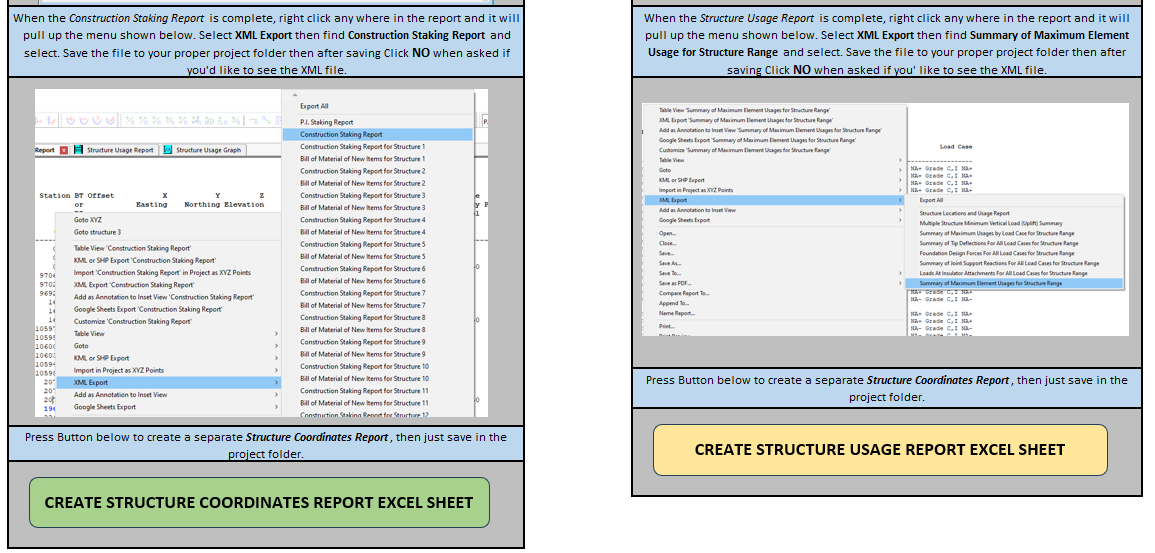
Create Seperate Properties Cost Excel Book: Would create an entirely new Excel Workbook and copy the Property Costs over while leaving pasting only the values for the costs and keeping the formulas for the sum of the costs. This would be sent to our third party reviewer to ensure everything was being counted correctly while not sharing client pricing specifics
Creating Separate Excel Book for Variant of Bill of Materials: Would create a separate Excel Workbook and create a variant of the Property Units that would be sent to our client for ordering materials, this required some different information and a different format than our property costs and was done manually before.
Creating Second Version of Code for Underground Staking Sheets
The Overhead sheets were so productive I was asked to replicate this process for our Underground Staking Sheets. The main challenge with this request is that the OH staking sheets had a set number of columns that would never increase. The UG staking sheets had a different format where columns would be added for additional units while also adding rows for addition station where equipment would be installed. The other problem was that the UG staking sheets were a set number of rows by columns, so when additional columns were added to the All Combined sheet, my algorithm would have to sort through all the columns and leave out units that were blank on specific paged. It would require an entirely new method of transferring the information to individual staking sheets as well as creating a bill of materials. Then the biggest problem is
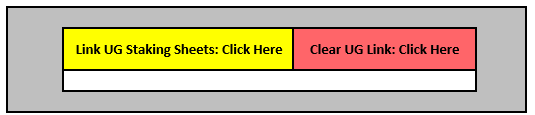
In the end I figured out the logic for copying over the All Combined Units into individual Staking Sheets while keeping minimal changes to how the user would use the UG staking sheets. Then finally I added commands that would link the two projects together allowing for a single Property Costs and Property Units to be made for a project with both OH and UG components without needing the user to make any edits to them.
Warning, Stops, and Finishing Touches
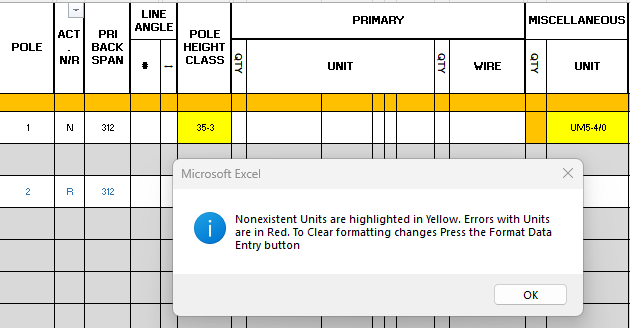
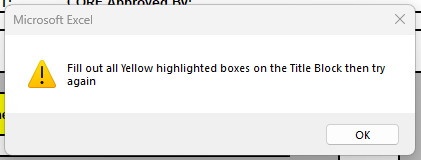
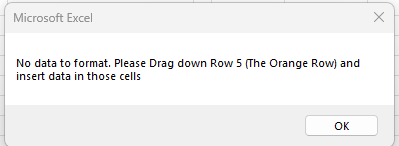
The final addition was adding warning for the commands or blockers. For instance if there was part of the Title Block not filled out the “Copy to Staking Sheets” command would give the user the instructions to fill out the specific missing cell then try again.
All of these messages and blockers were intended to make the deliverables making process idiot proof. Even new hires would not be able to cause errors or be missing information required.
With all of functionality of the sheets completed I needed to make sure that the Template as a whole could not be mistakenly edited causing errors with the commands. I did this in a multitude of ways
Locking all reference sheets
Locking ability to add Columns for the OH All Combined sheet
Locking ability to add Rows for the UG All Combined sheet
In order to do this I had to have the macros lock and unlock all the needed sheets when performing commands. This involves for other linked sheets as well like if an UG Staking Sheet was linked its sheets would have to be locked and unlocked while commands were running on the OH Staking Sheets
Final Results
The finished result was a deliverables making tool that cut down the time needed to create, edit and finalize deliverables. A process that used to take roughly 30 minutes to make an edit and remake all the deliverables was now cut down to approximately 10 minutes. This process also limited the ability for any users to make mistakes. It increased the productivity, quality, and accuracy of the entire team’s Construction Packages.
Even after I left the company these Staking Sheets both OH and UG are still be used and as the team continues to grow the amount of time and frustration saved will also continue to grow
Engineering Takeaways
Learned VBA in order to code Macros to automate Excel commands
Critical thinking in order to take existing format and be able to automate it without creating errors
Debugging errors in commands and finding root cause of error
Optimizing visible features to reduce file size and RAM in order to keep smooth operation during user interaction
Taking initiative to fix problems in workflow
Taking feedback from user to improve functionality and usability